Manage Blogspot like a full website admin
Publish products, take orders, edit SEO, export and import data — things Blogger can't do by default, all in one window.
Updated 28/10/2026 · latest Chrome, Cốc Cốc and Edge · See what changed
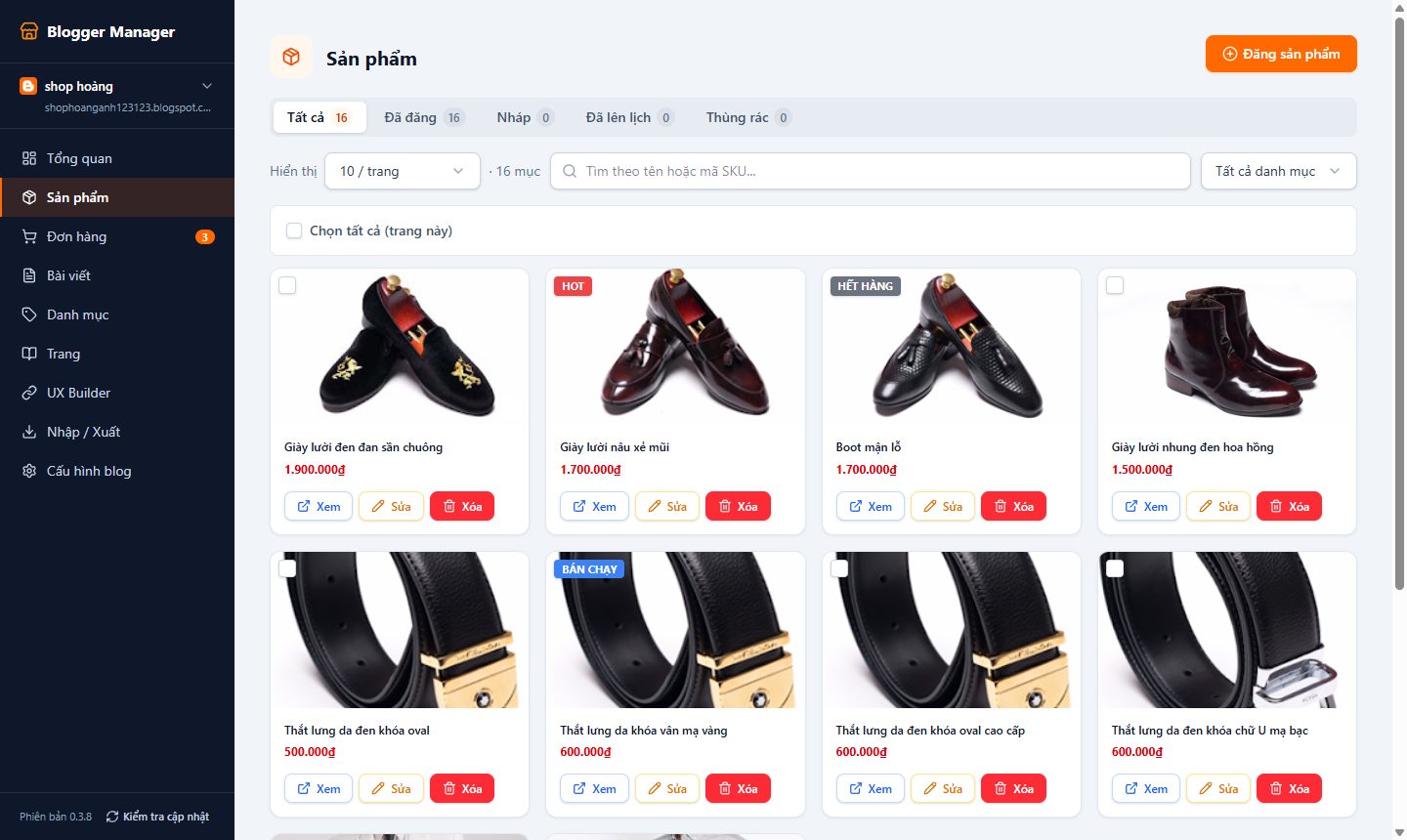
Do more than default Blogger
Each feature states what the original Blogger is missing, so you know what you gain.
Selling
Publish products like a store
Price, sale price, size/color variants (a separate price per combination), Hot/Sale/Sold-out badges, drag-and-drop image ordering, schema.org microdata for Google.
Default Blogger: Only the regular post editor.
Orders and inquiries in one place
The checkout and contact forms on the theme send to the Orders page: change status, internal notes, filter, export CSV.
Default Blogger: No order form or place to manage orders.
New-order alerts via email & Telegram
Sent through your own SMTP (Gmail, Outlook, Zoho...) and your own Telegram bot, with a test-send button.
Default Blogger: None.
Custom forms
Build sign-up forms, surveys, quote requests... and get an embed code for any page.
Default Blogger: Only the simple Contact Form gadget.
Data & appearance
Fast export per blog
Download the theme XML, posts/products/pages and the order CSV of the selected blog — done in seconds.
Default Blogger: Content backup moved to Google Takeout: it bundles your whole account, then you wait for a link by email.
Import data keeping URLs & publish dates
Move content between blogs while keeping paths like /2023/07/post.html and the original publish dates; it waits automatically when Blogger rate-limits.
Default Blogger: The importer requires reCAPTCHA and manual file selection.
Load a theme in 15 seconds
Pick the .xml file and you're done — it pastes and saves into Blogger's HTML editor for you, then reloads the page.
Default Blogger: Open Theme → Edit HTML and paste by hand; error-prone for large themes.
Edit Layout right in the extension
Open Blogger's Layout and HTML editor inside the management window, with no tab switching.
Default Blogger: You have to open blogger.com separately.
Content & SEO
Edit URL & search description
Change the permalink and SEO description while writing a post, product or page.
Default Blogger: The Blogger API doesn't allow editing these two fields.
Category (label) SEO
Each label gets its own display title, description and share image, written straight into the theme so Google can read it.
Default Blogger: Label pages only show the raw label name, with no description.
Bulk actions
Select many posts to publish, move to draft, add/remove labels, delete or restore from trash with a single click.
Default Blogger: Limited; you have to work page by page in the list.
Lighter images
Compress and crop images to a ratio before uploading, and reuse old images from Blogger or Google Photos.
Default Blogger: Uploads the original image, making pages heavy.
Advanced blog settings
Title, description, search engine visibility, meta tags, time zone, feeds... gathered in one form.
Default Blogger: Scattered across many dialogs.
Default Blogger vs. Blogger Manager
| Task | Default Blogger | Blogger Manager |
|---|---|---|
| Export one blog's data | Google Takeout, wait for email | A few seconds, direct download |
| Load a new theme | Paste by hand into Edit HTML | 15 seconds, automatic |
| Products with variants & prices | None | Yes, a separate price per combination |
| Order form + order management | None | Yes, with email/Telegram |
| Edit URL & SEO description via tools | No | Yes |
| Category page SEO | No | Title, description, share image |
| Bulk actions | Limited | Full |
Installed in 2 minutes
Do it once; afterwards just click "Check for updates" in the extension.
Download v0.6.26 (.zip)Your blog data
Posts, pages and products go straight from your browser to Blogger. Our server only stores what features need: orders from forms, category SEO settings and notification settings.
-
1
Download and extract
Click the download button to get the .zip file, then extract it to a permanent folder (don't delete this folder after installing).
-
2
Open the extensions page
Type chrome://extensions in the address bar and turn on "Developer mode" in the top right corner.
-
3
Load the unpacked extension
Click "Load unpacked" and choose the folder you just extracted.
-
4
Pin & sign in
Pin the Blogger Manager icon to the toolbar, click it and sign in with the Google account that manages your blog.
Frequently asked questions
Is the extension free?
You download and install the extension for free, then sign in with the Google account that manages your blog to start using it.
Why do I need to turn on Developer mode?
The extension is distributed directly as a .zip file for fast updates, so Chrome requires Developer mode when installing. This is a standard Chrome step and does not affect your browser's security.
How do I update to a new version?
Click "Check for updates" at the bottom of the sidebar inside the extension. When a new version exists, download the .zip, extract it over the old folder, then click Reload on chrome://extensions.
Does it work with multiple blogs?
Yes. Every blog in your Google account appears in the list, and you can switch between them with one click.
Got the extension? Now pick a theme.
Our themes are built together with the extension — orders, inquiries and category SEO work right after you load them.
- Automatic VietQR payment
- Get your file right after payment
- Load a theme in 15 seconds with the extension